
Parsek Company Management keeps your customers, suppliers and subcontractors in separate lists under the Firmalar menu. VKN/TCKN (tax ID) and IBAN validation, KVKK-compliant records, the account summary, invoices, orders, contracts and progress payments come together on each company’s 360° card.
Do You Know Your Companies?
"What is this customer’s open balance? What did we last buy from this supplier? When does this subcontractor’s insurance policy expire?" The company card gathers the answers from accounting, purchasing and contract records, so you do not need to keep a separate list.
Key Features
Three Company Types
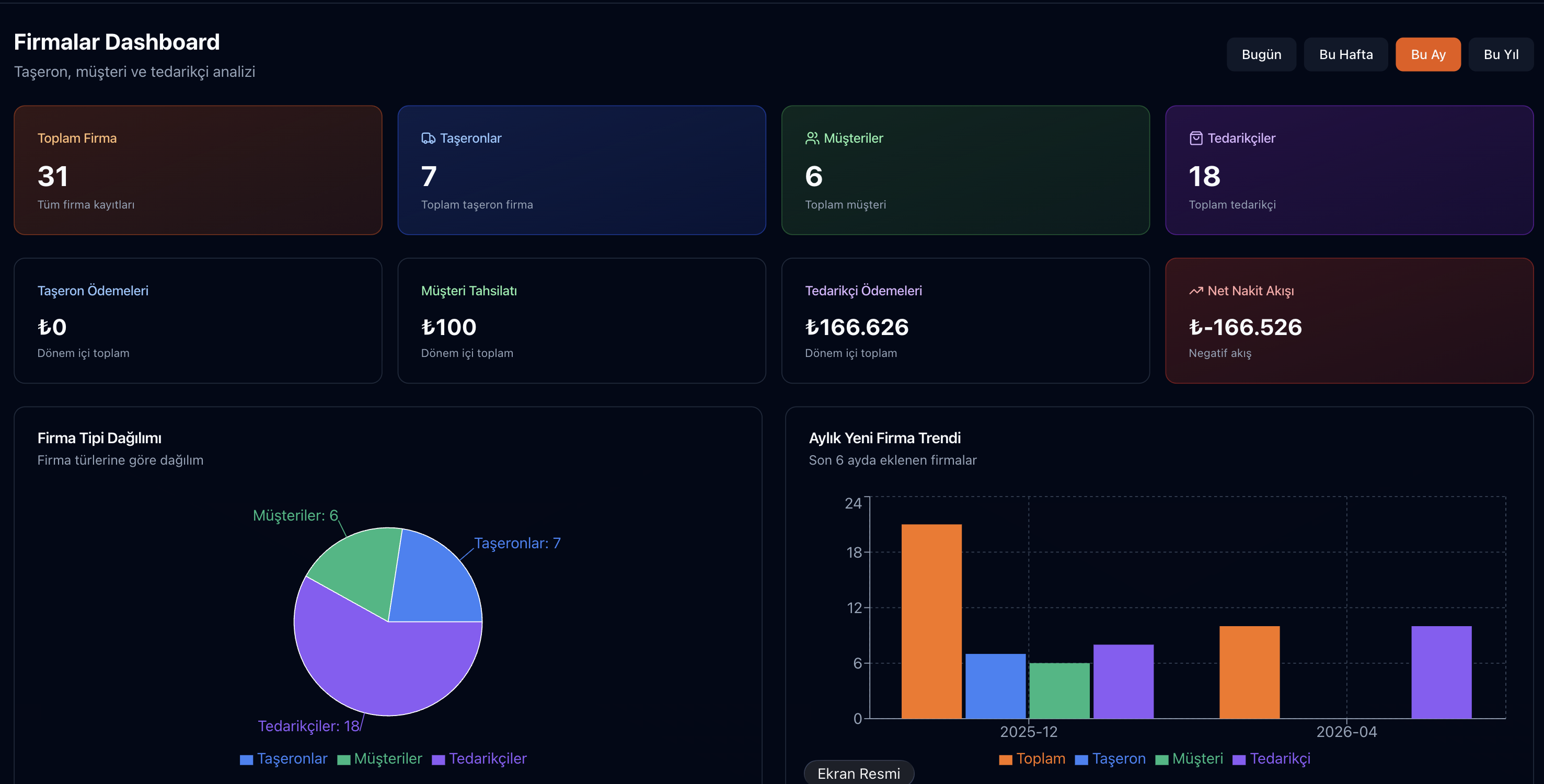
Firmalar › Müşteriler, Tedarikçiler and Taşeronlar are separate lists; Firmalar › Dashboard shows the type breakdown, new companies per month, the most active and the latest companies. Lists can be exported to Excel.
Tax ID and IBAN Validation
The 10-digit VKN and 11-digit TCKN are checked with their check digit and the IBAN by format; if the same company is about to be created twice, a warning appears and you can open the existing record.
360° Company Card
Account summary, monthly debit/credit chart and type-specific tabs: account movements, invoices, contracts, orders, progress payments, cheques/notes, and the subcontractor’s staff and vehicles. The card can be printed or saved as PDF.
Supplier Evaluation
Each order can be rated 1–5 for delivery speed, price, quality and communication; the average is calculated on the server and shown on the card’s Evaluations tab.
Subcontractor Documents
Documents such as social security records, tax certificate, insurance policy and authorisation certificate are uploaded to the subcontractor card with an expiry date; mandatory types are set under Taşeronlar › Evrak Türleri and expired or expiring documents are summarised.
Status, Blacklist and Guarantees
A company can be deactivated or blacklisted; no new purchase or sale can be made with a blacklisted company. Guarantee type (letter of guarantee, cheque, cash), amount and validity date are kept on the card.
Supplier Approval and Price History
With the optional "only approved suppliers in purchasing" setting, unapproved suppliers cannot be selected in quotes and orders. The Price History tab lists unit prices bought from the supplier.
KVKK Compliance
Disclosure text, explicit consent, data subject request tracking integrated.
How Company Management Works
Try this free for 14 days. No credit card required.
Try Now →1. Add or import companies
Create companies one by one or import them in bulk with the Excel template; the preview shows invalid rows and duplicates are skipped.
2. Complete the card
Enter tax, contact and bank details, guarantees and subcontractor documents; approve the supplier if approval is required.
3. Follow from the 360° card
Track account movements, invoices, orders and progress payments on the card; evaluate the supplier after an order is delivered.
Frequently Asked Questions
How do I import my existing customer/supplier list?
Bulk import using an Excel template. VKNs are validated, missing data is flagged; for data migration, contact our support team.
How is a supplier rating created?
Manually. You pick one of the supplier’s orders and rate delivery speed, price, quality and communication from 1 to 5; the average of the four criteria is taken. The system does not generate the rating by itself.
Where does the KVKK disclosure text come from?
It comes pre-prepared as a template; it can be customized by your company's lawyer; date-stamped versions are kept in the archive.
How do permissions work?
Per role: view, create, edit and delete permissions are separate for customers, suppliers and subcontractors. Financial details such as IBAN, bank, balance and subcontractor staff salaries require a separate permission.
What if the same company was created twice?
With Merge, the source record’s invoices, orders and movements are moved to the target record and the source is deleted. The action cannot be undone; changes appear on the card’s History tab.
Can I see whether a company is an e-invoice taxpayer?
Yes, while issuing an invoice. If your e-invoice provider is connected, the invoice form queries the recipient’s tax ID and selects the document type accordingly.
Your Company Information on One Card
Instead of scattered lists, each customer’s, supplier’s and subcontractor’s account, documents and transaction history on the same card.