
Parsek Progress Payment Application Tracking module prepares contractor (müteahhit) and subcontractor (taşeron) progress payment applications (hakediş) in accordance with Turkish construction legislation, with automatic quantity-work item matching. It ensures the entire process, from interim payment applications to final accounts, becomes digital, auditable, and one-click approvable.
Why is the Progress Payment Application Process So Critical?
A progress payment application (hakediş) is a periodic payment document issued to the contractor in construction projects. Incorrectly calculated unit prices, missed work items, or late-issued progress payment application reports can lead to cash flow crises and even contract termination risks. As per legislation, interim progress payment applications must be prepared within the first 5 business days of each month, and final progress payment applications up to 6 months after the provisional acceptance of the work.
Parsek Progress Payment Application Tracking eliminates this time and accuracy pressure. The unit price list in the contract, quantity data from the field, and the approval chain converge on a single screen.
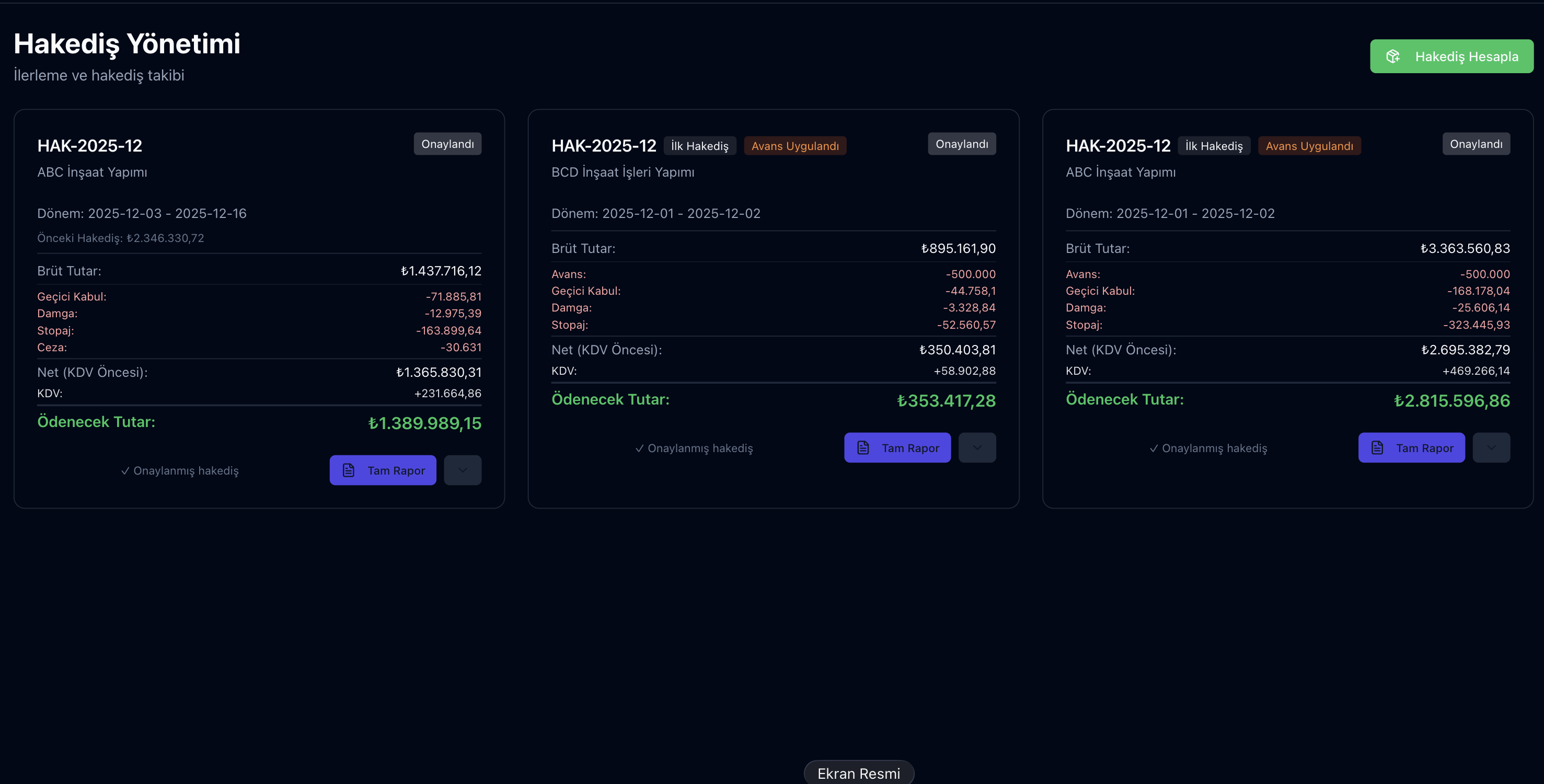
Key Features
Automatic Unit Price Matching
Bill of quantities items in the contract automatically match quantities from the field, eliminating manual errors.
Interim + Final Progress Payment Applications
Monthly interim progress payment applications and year-end final accounts are managed separately, producing reports compliant with legislation.
Quality Deduction / Withholding / Stamp Tax
Deductions are calculated automatically: stamp tax at 9.48 per mille (0.948%), VAT withholding, quality defect deduction (nefaset bedeli).
Approval Chain (Workflow)
Site manager → Project manager → Financial advisor → General manager: multi-step approval.
Work Variations (Increase/Decrease)
Additional payment process for out-of-contract work items within the scope of progress payment applications.
Automatic Accrual
The approved progress payment application is debited to the current account with one click, initiating invoice period tracking.
Minimum Labor Link
The base of approved employer progress payments feeds the minimum labor calculation; the gap with reported labor shows on the project card. Details
Journal Vouchers
Approved employer and subcontractor progress payments, with their deductions, become sources for period voucher generation. Details
Progress Payment Application Preparation Process
Try this free for 14 days. No credit card required.
Try Free →1. Contract + Bill of Quantities Upload
After your project is created in the system, bill of quantities items are uploaded from Excel or a unit price list. Each item's code (pozu), unit, unit price, and total bill of quantities amount are defined.
2. Field Quantity Entry
The site manager enters the monthly work quantity from desktop or phone. The system compares cumulatively with previous periods.
3. Automatic Calculation + Deductions
Unit price × quantity are multiplied automatically; VAT (KDV), stamp tax (damga vergisi), quality defect (nefaset bedeli), advance payment deduction (avans mahsubu), and previous period's cumulative progress payment application are applied to the total amount.
4. Multi-Stage Approval
Progress payment applications are digitally approved in sequence: field → office → financial advisor → general manager. At each stage, there is a right to object/revise.
5. Accrual + Payment
The approved progress payment application is automatically debited to the Current Account; it appears in the cash flow report according to the payment plan.
Deductions and Tax Calculations
| Deduction | Rate (2026) | Description |
|---|---|---|
| Stamp Tax (damga vergisi) | 9.48 per mille | On the progress payment application amount |
| VAT (KDV) Withholding (construction works) | 4/10 | In public works |
| Withholding Tax (multi-year projects) | %5 | In multi-year widespread projects |
| Quality Defect Deduction (nefaset bedeli) | As per contract | For quality deficiency |
| Advance Payment Deduction (avans mahsubu) | %20-30 | Based on the contract |
Frequently Asked Questions
Does the system support my multi-unit (m³, m², ton) work items?
Yes, you can assign different units to each work item. The system automatically performs unit conversions and shows both units and TL in reports.
Can I produce public-sector progress payment output?
The progress payment report is produced as PDF with your company’s print template. We recommend checking it against your client’s required layout on the first payment.
Can I also manage progress payment applications from subcontractors?
Yes, subcontractor (taşeron) progress payment applications are managed in a separate workflow: first, the progress payment application prepared for the subcontractor, then linked to the progress payment application to be submitted to the employer from the main contract.
How are progress payment application archives for past years maintained?
All progress payment applications are archived indefinitely as PDF + raw data. You can access all requested historical progress payment applications in seconds during a tax audit.
How are scope increases/decreases managed?
A scope increase record is opened for work outside the contract; the increase limit defined in the contract or regulation is checked by the system.
Prepare Progress Payments From One Source
Try this free for 14 days. No credit card required.
Try Free →Contract, quantities, deductions and approval on the same record; the payment flows to the account, the minimum labor calculation and journal vouchers from the same data.