
The Parsek Vehicle & Fleet Management module keeps your cars, commercial vehicles and heavy machines (own or subcontractor; purchased, rented or leased) in one list. Fuel, maintenance, fines, trips, reservations, transfers and work logs come together on the vehicle card, and cost is calculated the same way for every vehicle.
One Definition of Vehicle Cost
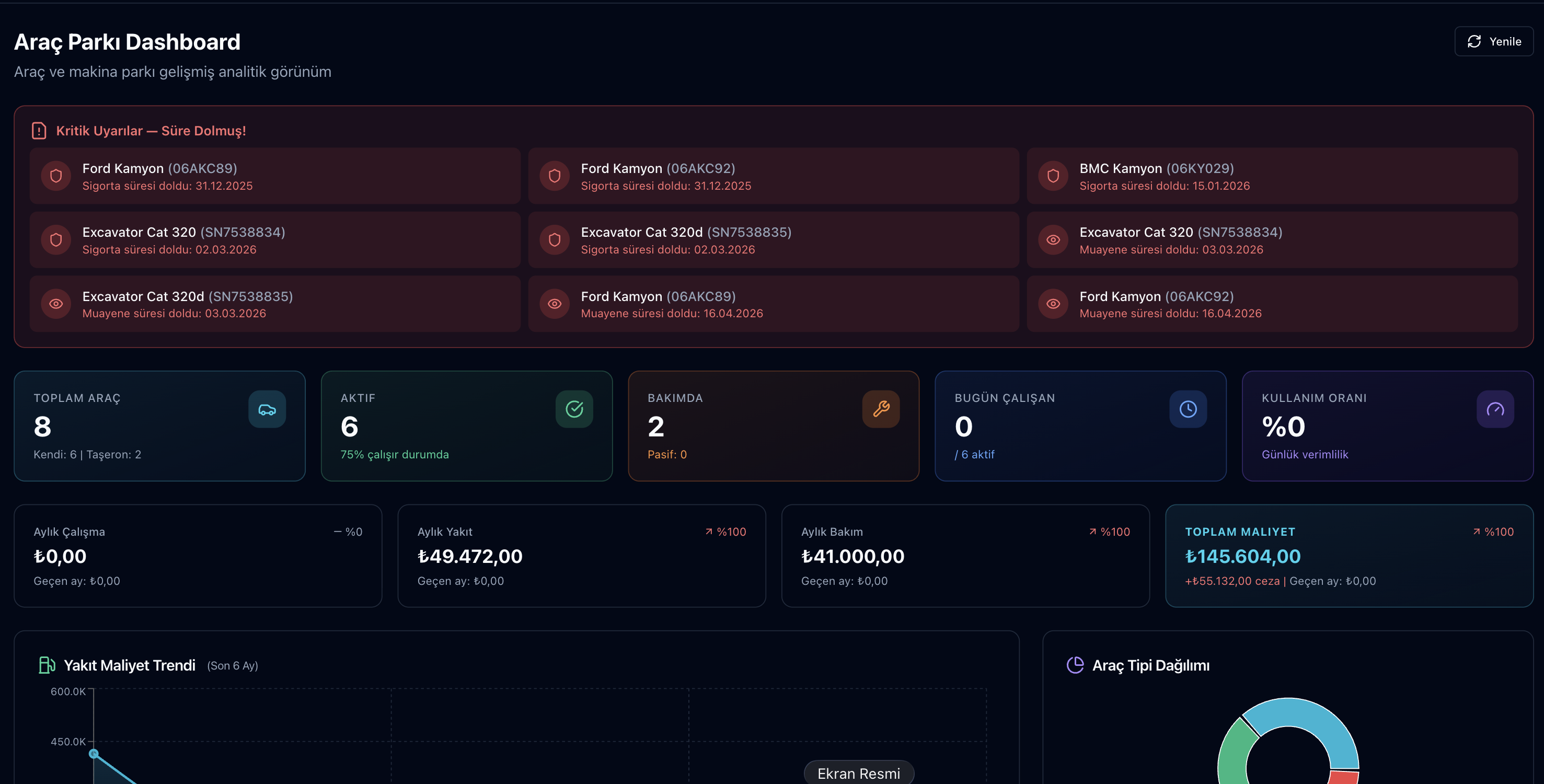
A vehicle’s operating cost is made up of fuel, maintenance, work orders, tires, fines borne by the company, rent and insurance payments, and trip expenses. Parsek adds these up with the same definition on the fleet dashboard, on the vehicle’s 360° profile and in the total cost of ownership (TCO) view; purchase price and sale revenue are shown separately.

Key Features
Vehicle and Machine Card
Plate / serial no, type, make-model, year, fuel type, usage (km or hours), ownership (own / subcontractor), acquisition (purchase, rental, leasing), location, default driver and toll tag details.
Insurance and Inspections
Compulsory traffic insurance, comprehensive (kasko) insurance, roadworthiness and exhaust inspection dates are kept on the card. Entering insurance premiums or a monthly rent / lease amount creates a payment plan automatically.
Fuel Records
Station refills or fuel issued from your own depot stock; litres, unit price, odometer, receipt no, station and project. Consumption is calculated refill to refill in L/100 km, or L/hour for hour-based machines.
Fine Records
Traffic, toll (HGS/OGS), tonnage, inspection, insurance and municipal fines with sub-categories; discounted amount, document, payment from cash or bank, and optional charge-back to the driver.
Trips / Tasks
Vehicle and driver assignment, origin and destination, start and end km; fuel, toll and other expenses. A trip is planned, started, completed or cancelled.
Reservations and Transfers
Reservation requests and approval for pool vehicles; overlapping reservations or trips on the same vehicle are blocked. Companies using locations move vehicles between them with approved transfers.
Work Log
Daily km or operating hours and unit rate per vehicle, with bulk entry. For a subcontractor’s vehicle, the work log is posted as a payable to the subcontractor’s current account.
360° Profile and TCO
Vehicle KPIs, a 12-month fuel-maintenance-km trend, upcoming due dates, documents, driver assignments and lifecycle events; disposal by sale, scrapping or return, and undoing a disposal.
How It Works
Try this free for 14 days. No credit card required.
Try Free →1. Add your vehicles
Enter vehicles one by one under Araçlar › Araç Listesi or import them from Excel; add insurance and inspection dates to the card.
2. Enter daily records
Refills go to Yakıt & Cezalar › Yakıt Kayıtları, trips and daily km / hours to Çalışma & Görevler. Staff can enter fuel receipts from the Employee Portal in a phone browser.
3. Track cost and due dates
The fleet dashboard shows monthly fuel, maintenance and operating cost, plus expired and upcoming (30-day) due dates; open the vehicle’s 360° profile for details.
Where to Find It
| Menu › Screen | What you do there |
|---|---|
| Araçlar › Araç Listesi | Vehicle and machine cards, Excel import, show disposed vehicles |
| Araçlar › Transferler | Transfer requests and approval between locations (for companies using locations) |
| Araçlar › Rezervasyonlar | Pool vehicle requests, approve / reject, overlap check |
| Çalışma & Görevler | Work log (Çalışma Puantajı) and trips (Görev / Sefer) |
| Yakıt & Cezalar | Fuel records and fine records |
| Bakım | Maintenance records; Tire Management and Maintenance with add-ons |
| Canlı Filo Takip | Live map with the Arvento Fleet Tracking add-on |


Frequently Asked Questions
Are GPS / vehicle tracking devices supported?
Arvento only. With the Arvento Fleet Tracking add-on, vehicle positions appear on the live fleet map and km / engine hours feed the work log. There is no integration with other GPS providers.
Is there a separate process for rented and leased vehicles?
Yes. For vehicles acquired by rental or leasing, contract dates, monthly amount, provider and contract no are kept; a monthly payment plan is created automatically and managers are notified 30 days before the contract ends.
Is there a fuel card integration?
No. Refills are entered in fuel records manually or from the Employee Portal; payment is linked to the station’s current account, a cash register or a bank account. Fuel from your own depot can be issued to a vehicle as a stock withdrawal.
Can the same module be used for heavy machines?
Yes. For a machine whose usage is set to hours, the work log is kept in operating hours and fuel consumption is calculated in L/hour; the Maintenance add-on supports hour-based maintenance plans.
Can I track maintenance without the Maintenance add-on?
Yes. Maintenance records (Bakım Kayıtları) keep the type (periodic, breakdown, service, part, tire, oil), workshop, invoice no, km and next service km / date; managers get an in-app notification and e-mail 7 days before the next service date.
How do insurance and inspection alerts work?
Managers receive a daily notification 30 days before compulsory traffic insurance, comprehensive insurance and exhaust inspection expire. All due dates, including roadworthiness inspection, are listed as expired or upcoming on the fleet dashboard and the vehicle’s 360° profile.
Every Vehicle’s Records and Cost in One Place
Try this free for 14 days. No credit card required.
Try Free →From fuel to fines, from maintenance to trips, all records sit on the vehicle card; cost and due dates on the fleet dashboard.