
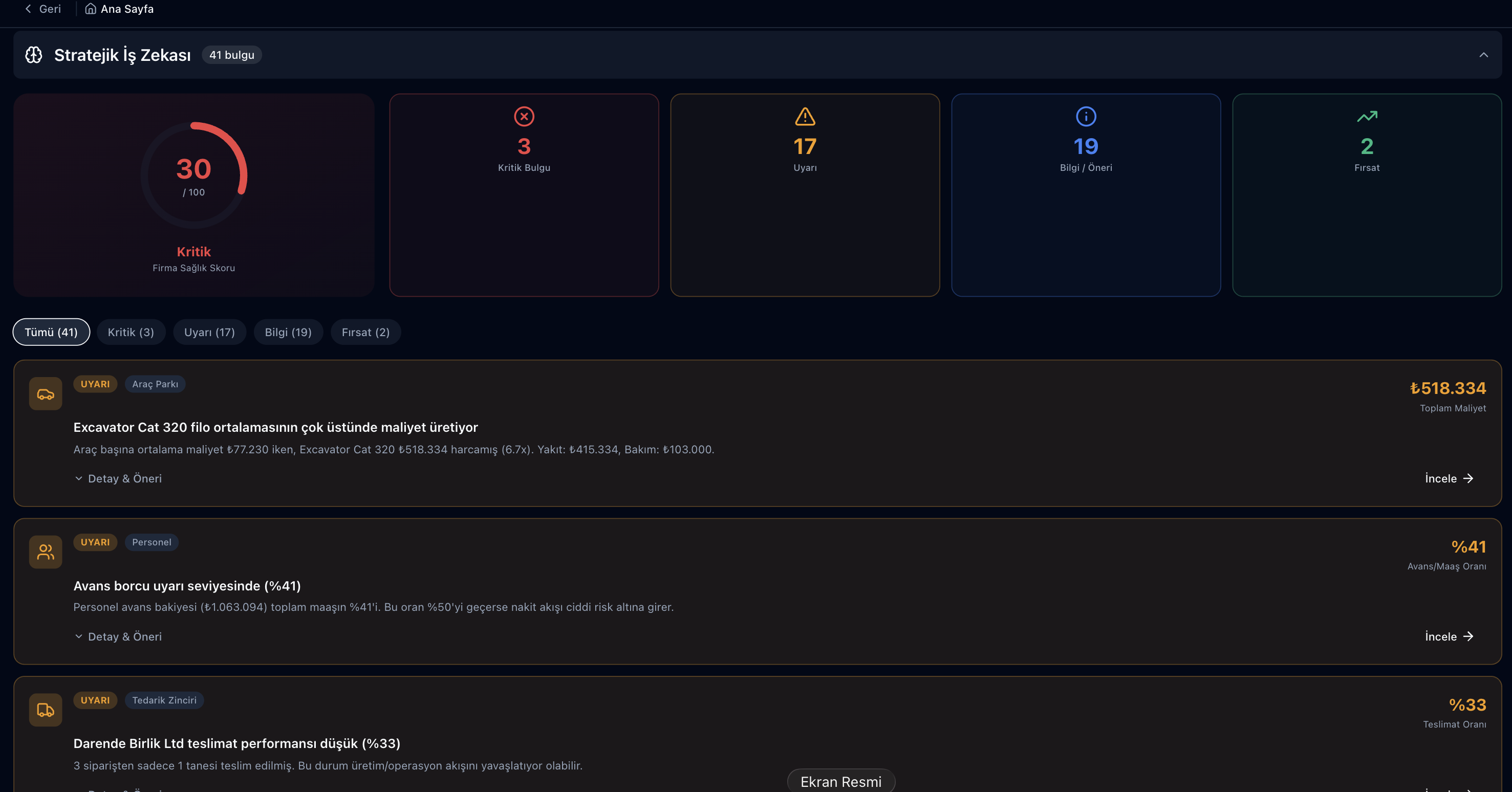
The Parsek Strategic Business Intelligence add-on opens the Company Summary (Firma Özeti) screen: your finance, staff, vehicle, stock, supply chain, contract and production records are summarised on one screen; defined rules produce critical, warning, info and opportunity insights, and a 0–100 Company Health Score is calculated from them.
Are Your Numbers Scattered Across Screens?
Bank balances live in Finance, overtime in Attendance, critical stock in the Warehouse and expiring contracts in Contracts. Company Summary reads these records together, highlights where a threshold is exceeded and takes you from each insight to the related screen in one click.
Key Features
Insights and Recommendations
Insights ranked as Critical, Warning, Info and Opportunity; each has an explanation, a recommendation and an "Inspect" link to the related screen. Categories: finance, staff, vehicle fleet, stock, supply chain, contracts and operations.
Company Health Score
A 0–100 score from the number of critical and warning insights. The same score appears in the Company Health Score tile on the home page and in the weekly notification.
Threshold Settings
An administrator adjusts 18 thresholds to the company — staff turnover, overtime, absenteeism, e-invoice error rate, unpaid invoice amount, debt/receivable ratio, project profit margin, critical stock and more — and can reset them to defaults in one click.
Cash Flow Forecast
30- and 90-day views: inflows from received cheques/notes; outflows for loan instalments, payroll employer cost, issued cheques/notes and subcontractor progress payments; net result.
Scenario Simulator
Monthly cost, liquidity and liability impact of adding/removing staff, adding/removing vehicles or drawing a loan. Baselines are the monthly average of the last 90 days; assumptions are shown on screen.
Period and Seasonal Comparison
Last 12 months against the previous 12: headcount, leavers, expenses, fuel, maintenance, receivables and payables. Monthly cost distribution over the last 24 months shows seasonal peaks.
Location Comparison
Actual cost per site and location: expenses, fuel, maintenance, paid fines, work orders, purchase orders and payroll employer cost.
Permission-Based View
Financial amounts, salary/payroll/advance details and staff names are hidden according to each user’s permissions; the screen states which sections are hidden.
How to Use Company Summary
Try this free for 14 days. No credit card required.
Try Now →1. Turn on the add-on
Once the Strategic Business Intelligence add-on is active, Firma Özeti appears in the sidebar and the Company Health Score tile is added to the home page.
2. Set thresholds for your company
An administrator changes warning and critical limits under Eşik Ayarları; insights are recalculated with these values.
3. Follow the insights and act
Read the recommendation on critical and warning insights, open the related screen with Inspect, and use the Scenario Simulator to see the monthly effect of a decision in advance.
How the Health Score Is Calculated
| Insight status | Score |
|---|---|
| 3 or more critical | 30 — Critical |
| 1–2 critical | 55 — Attention |
| No critical, 4 or more warnings | 60 — Attention |
| No critical, 2–3 warnings | 75 — Good |
| No critical, at most 1 warning | 90 + 2 per opportunity (max 100) — Excellent |
Frequently Asked Questions
Which data goes into Company Summary?
The records you enter in Parsek: bank and cash balances, receivables/payables, cheques/notes and loans, staff, attendance and payroll, vehicles, fuel and maintenance, stock, purchase requests and orders, contracts, production and e-invoice statuses. No external file or database is connected.
Are the insights generated by AI?
No. Each insight is based on a specific rule and threshold; for example, a warning appears when staff turnover over the last 12 months exceeds the warning threshold. Administrators change the thresholds under Eşik Ayarları.
Do I get notified about the Health Score?
Yes. Every Monday morning, if there is at least one critical or three warning insights, company administrators receive an in-app notification with the score and the main headlines.
Does everyone see the same screen?
The screen is available to users with Company Summary view permission. Financial amounts, salary details and staff names depend on separate permissions; users without them see those sections hidden.
Can I export Company Summary?
There is no export on the Company Summary screen. For data you want in Excel or CSV, use the ready-made and saved reports on the Reports screen.
Can I view it on my phone?
Yes. Parsek is mobile-friendly (PWA); Company Summary opens in your phone’s browser.
Base Your Decisions on Your Own Data
Try this free for 14 days. No credit card required.
Try Now →The records you enter in each module come together in Company Summary; the Health Score and insights show what is urgent.