
The Parsek Attendance (Puantaj) module records every day of every employee with a status code (worked, on leave, sick leave, half day, absent…). In hourly mode, clock-in and clock-out times and breaks are entered and net hours, overtime and the daily amount are calculated. Payroll is calculated from the same attendance.
Why Accurate Attendance Matters
Wrong attendance leads to salary errors, differences in insured days and severance disputes. In the construction sector in Turkey, the weekly working hours are limited to 45 hours; a 50% premium is paid for overtime, and a 100% premium for weekend work. In Parsek, attendance is kept in one place, and payroll, project labour cost and reports all use these records.
Key Features
Attendance Entry
Pick an employee, mark days on the monthly calendar and assign a status code; several days can be selected and given the same code at once. A note, a project and overtime hours can be added to a day.
Bulk Attendance
Choose a day and a status code; the same record is written in one step for the people you tick in the list of active staff at that location. Existing records for that day are shown in the list.
Hourly Attendance
If hourly mode is selected in company settings, clock-in and clock-out times, the break and the shift type are entered. Net hours, overtime and the daily amount are calculated; Saturday and Sunday multipliers are set in Puantaj & Bordro Ayarları.
Missing Attendance
Lists employees with no attendance for the selected day or date range, and days with approved leave that have not yet been posted to attendance; the list can be exported to Excel.
Leave and Shift Link
Leave days approved in İzin Yönetimi are posted to attendance as paid leave, unpaid leave or sick leave. Assignments from Vardiya Planlama can be transferred to attendance.
Attendance by Project
When projects are used, each day gets a project; actual man-hours in project resource reports come from these records.
Employee Portal
With the Employee Portal add-on, employees see their own attendance and enter the days they worked for the current and previous month. Leave and sick days cannot be entered from the portal.
Payroll Transfer and Lock
Payroll takes worked days, half days, leave, sick leave and overtime from attendance. Once the month’s payroll is approved, its attendance can no longer be changed.
Attendance Workflow
Try this free for 14 days. No credit card required.
Try Free →1. Enter attendance
In the app, enter daily records under Personel › Puantaj/Bordro › Puantaj Girişi, per employee on the calendar or with the bulk panel.
2. Check for gaps
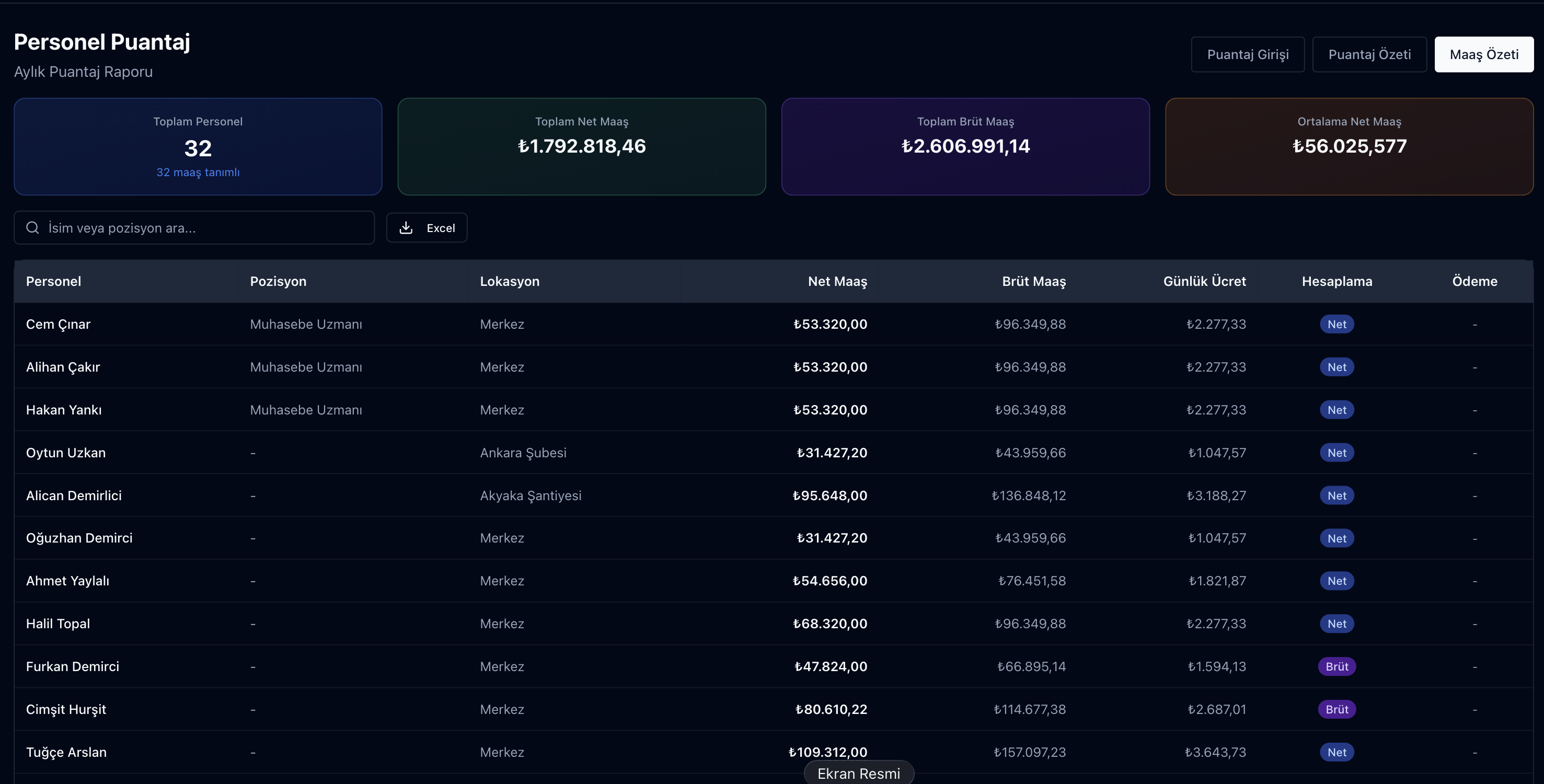
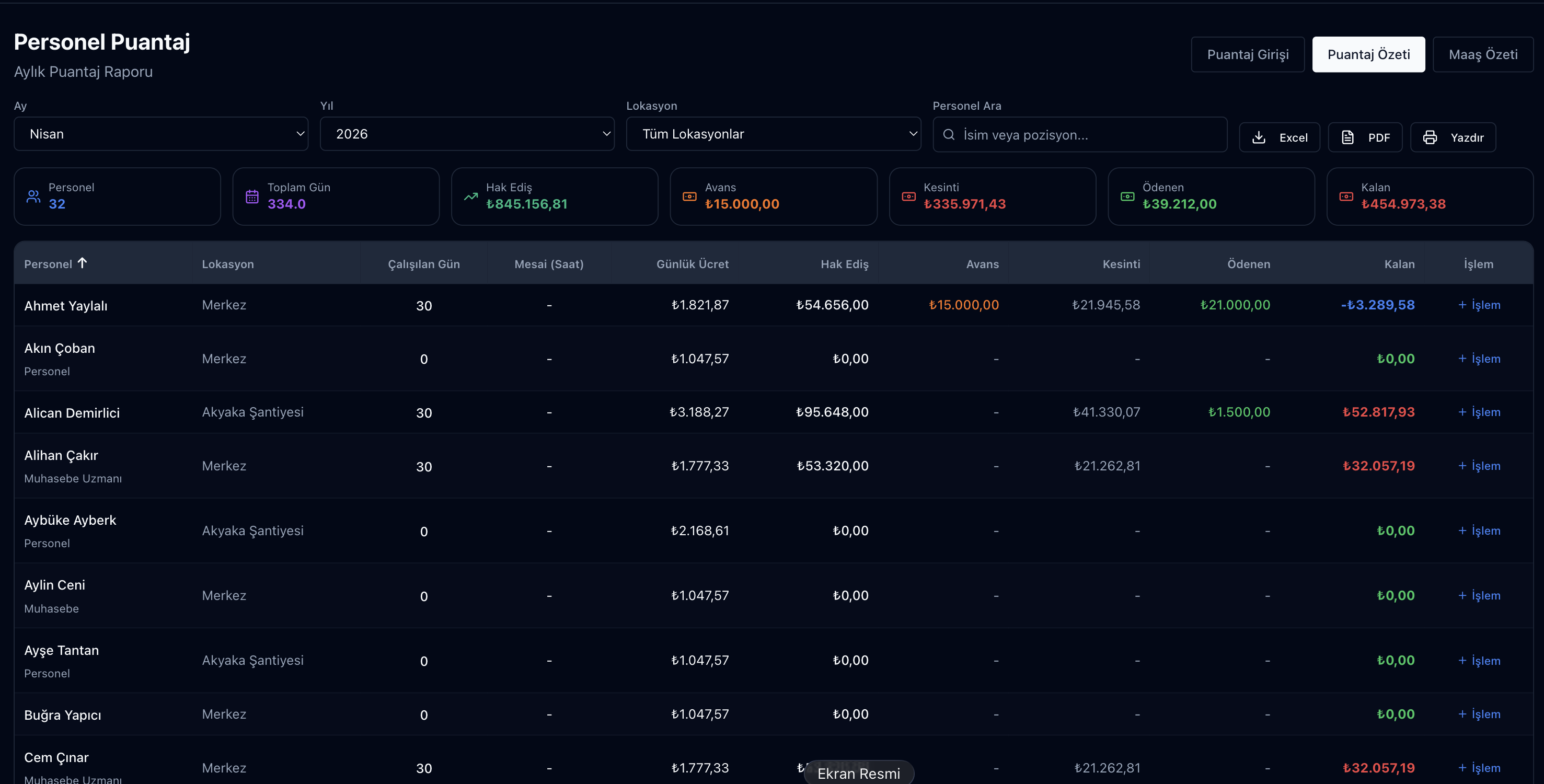
See missing days on the Eksik Puantaj tab; check the month’s totals in Puantaj Özeti and Maaş Özeti.
3. Move to payroll
Calculate the period on the Bordro tab; when payroll is approved, that month’s attendance is locked.
Status Codes
| Code | Meaning | Hours in standard mode |
|---|---|---|
| X | Worked | 8 |
| ÇY | No work (paid day, shown separately in reports) | 8 |
| I | On leave | 8 |
| R | Sick leave (medical report) | 8 |
| YG | Half day | 4 |
| DD | Absent | 0 |
| UI | Unpaid leave | 0 |
Frequently Asked Questions
What if an employee works on different projects?
When projects are used, each attendance day gets a project; actual man-hours then appear per project in the project resource report.
How is overtime calculated?
In standard mode, overtime hours are entered manually for the day. In hourly mode, net hours are derived from clock-in, clock-out and the break; if the shift type separates normal hours from overtime, hours above the daily normal are counted as overtime and paid with the multiplier in settings. Payroll warns when annual overtime exceeds 270 hours.
Is approved leave posted to attendance automatically?
Yes. Leave days approved in İzin Yönetimi are written to attendance as paid leave, unpaid leave or (for sick leave) a medical report day. Leave cannot be posted to a month whose payroll is already approved.
Can employees enter their own attendance?
Yes, if the Employee Portal add-on is enabled: employees enter the days they worked for the current and previous month, and a submitted record cannot be changed afterwards. Leave goes through a leave request; sick days are entered by a manager.
Can I export attendance to Excel?
Yes. Attendance records, the missing-attendance list and Puantaj Özeti can be exported to Excel; Puantaj Özeti can also be saved as PDF and printed.
Does it work with a time-clock (PDKS) device?
Parsek has no device connection of its own. The device vendor or an integrator can send card-swipe events or daily attendance through the Parsek API; daily attendance is calculated from the card-swipe events.
Enter Attendance Once, Use It Everywhere
Try this free for 14 days. No credit card required.
Try Free →Daily records, gap checks and payroll all run on the same data.