
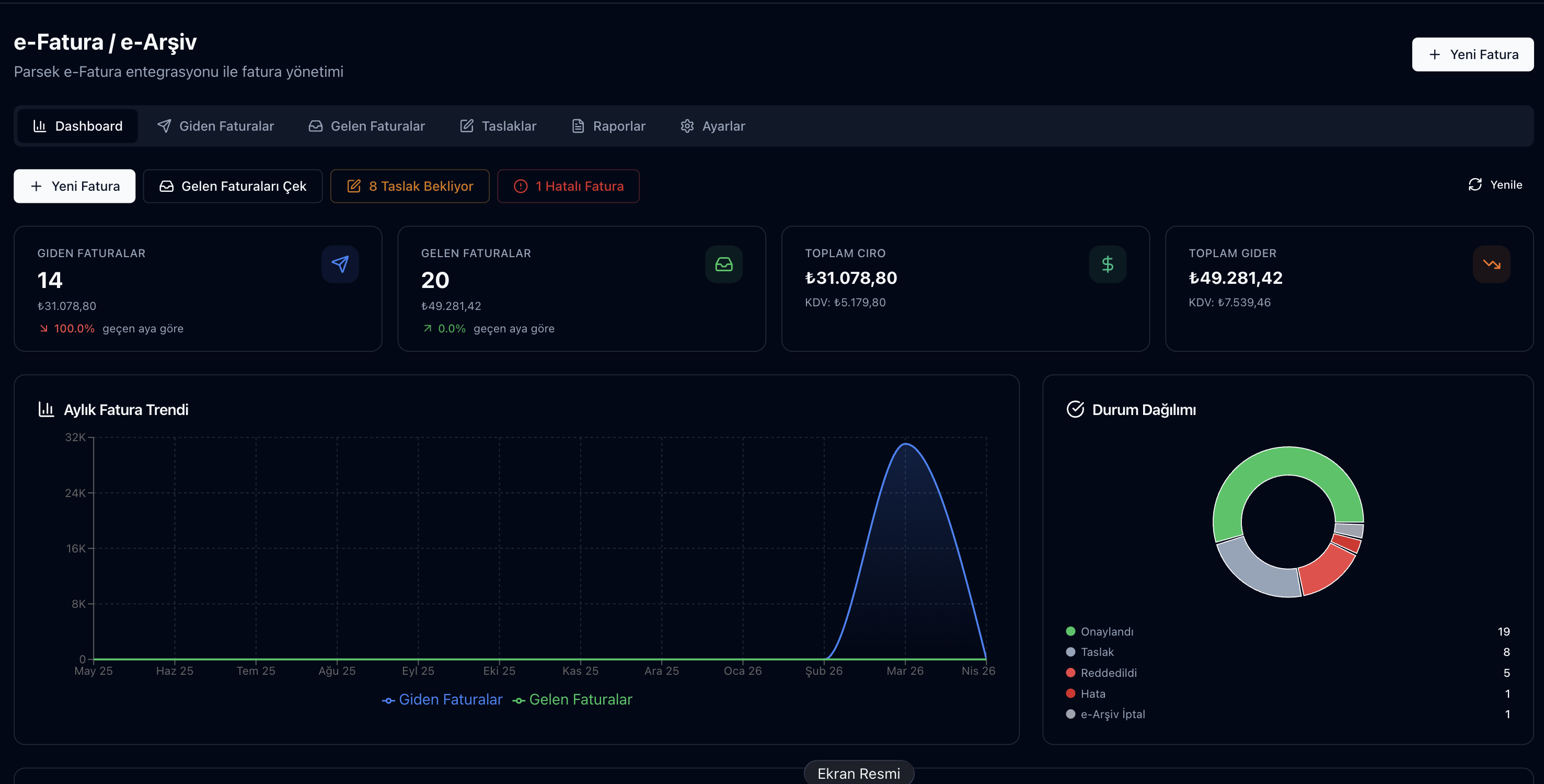
The Parsek e-Fatura (e-Invoice) and e-Arşiv (e-Archive) module digitally issues, sends, receives, and archives your invoices via a GİB (Turkish Revenue Administration) approved integrator (Uyumsoft). It fully automates e-fatura/e-arşiv processes, which are mandatory for companies with over 3 million TL in turnover as of 2026.
Regulatory Compliance is Risk Management
If you are an e-Fatura or e-Arşiv taxpayer and are still issuing paper invoices, a GİB penalty is imminent. Moreover, as of 2026, the limits are decreasing: turnover above 3 million TL → e-fatura is mandatory; invoices issued for over 30.000 TL to non-taxpayers, and over 5.000 TL to taxpayers must be e-arşiv.
Key Features
e-Fatura (B2B)
Issuing to taxpayers registered with the GİB e-fatura system; signing with financial seal is automatic.
e-Arşiv (B2C/B2B-extra)
Issuing to non-e-Fatura taxpayers or for transactions at the 5.000-30.000 TL threshold.
Bulk Invoice Generation
Generate dozens of invoices with a single click from Excel or the customer ledger.
Automatic Numbering
Series and sequence numbers are automatically generated in compliance with GİB standards.
Return / Cancellation Invoice
Standard return and cancellation processes (8-day rule) are controlled by the system.
Incoming Invoice Management
e-Faturas received from suppliers are automatically recorded; approval/rejection workflow.
e-Despatch Preparation
Drafts from sales shipments and warehouse transfers, GİB field checks and UBL-TR XML; submission once the integrator connection is completed. Details
Incoming e-SMM
Record freelance receipts with withholding, VAT and optional VAT withholding; posted to the account. Details
Invoice Issuance Process
Try this free for 14 days. No credit card required.
Try Free →1. Customer Verification
When the customer's VKN (Tax Identification Number) is entered, the system queries GİB to check if they are an e-fatura taxpayer; it automatically selects the correct type (e-fatura or e-arşiv).
2. Invoice Creation
Product/service line, quantity, unit price, VAT rate (0/1/10/20), withholding (if any), discount. All calculations are automatic.
3. Financial Seal Signature
The invoice is signed with a financial seal; sent to GİB via the integrator (Uyumsoft).
4. Approval / Rejection Tracking
For e-Fatura, the recipient approves/rejects (within 8 days); the system continuously monitors the status.
5. Customer Ledger + Stock Impact
The approved invoice is automatically debited to the Customer Ledger; sold products are deducted from Stock.
Frequently Asked Questions
Is anything else required for the financial seal?
Your financial seal device or electronic signature certificate is defined in the system once; it is automatically used for all invoices.
Can I import my old (paper) invoices into the system?
Yes, past invoices can be imported for archiving purposes; these records are not resent to GİB but are visible in reports.
How are cancellation / return processes handled?
For e-Fatura, the recipient can cancel by rejecting within 8 days. After 8 days, a return invoice is issued; the system automatically monitors the timeframe.
What is the exchange rate source for foreign currency invoices?
CBRT (TCMB) rates are fetched automatically and the TRY equivalent of the foreign currency amount is calculated with them.
How are invoices exported to accounting software?
In the Accounting Bridge pick the period and use Fiş üret to turn invoices into draft vouchers; on the Aktarım tab download a file for Luca, Mikro, Logo, Zirve or a generic layout. Layouts are being validated with accountants. Accounting Bridge
Your e-Document Processes on One Screen
Manage e-Invoice and e-Archive, e-Despatch preparation and incoming receipts in one place with Parsek + Uyumsoft.